
Introduction
Local searches drive business. Almost half of Google searches aim for local help. This fact shows that local SEO matters a lot for businesses in Thailand. For a store near you, high ranking on Google Maps can boost foot traffic, online actions, and sales. Consumers use Google Maps to find nearby services. In this guide you find proven ways to rank higher on Google Maps in Thailand. By the end you know how to beat rivals and attract more customers.
Why Local SEO Is Key for Businesses in Thailand
Local SEO works on location-based searches. Data shows that searches with local intent are growing fast. Between 2019 and 2020, searches with "near me" doubled. In 2023, almost every customer looks online for local businesses. If your local presence is weak, you lose chances.
For businesses in Thailand:
- 78% of mobile local searches lead to store visits within one day.
- 67% of people use Google Maps for directions.
- 92% of search users choose businesses on the first page of local results.
These data points show that a good Google Maps listing builds trust and visibility. A well-tuned profile brings more visitors and sales.
Case Study: Local Thai Restaurant
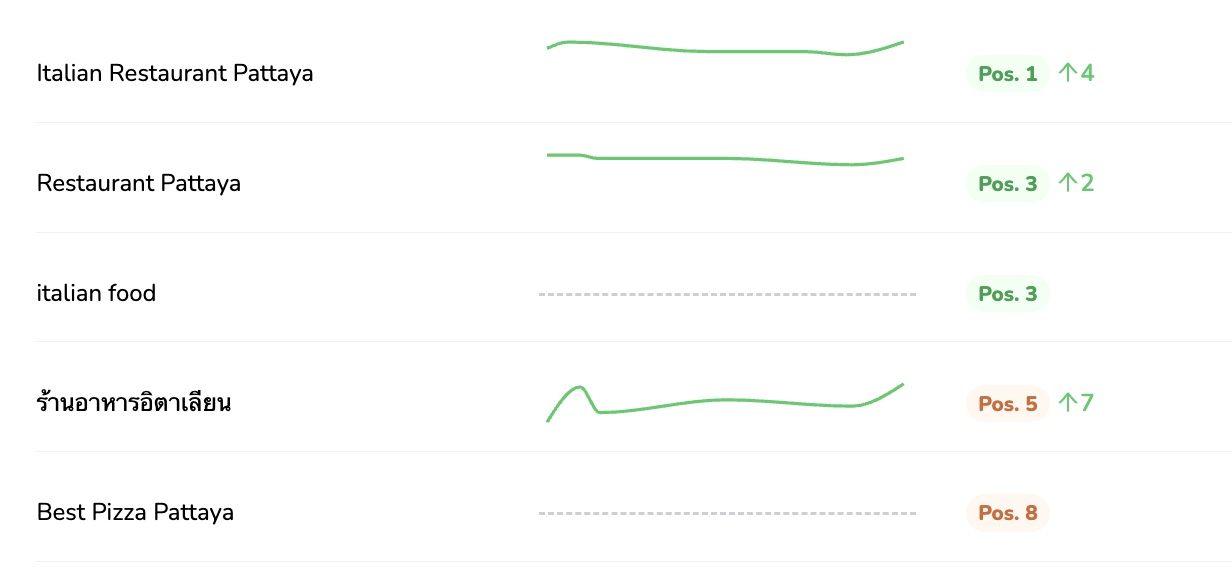
Consider a Thai restaurant that improved its ranking. The owner claimed the Google My Business listing, updated facts, and asked customers for reviews. Within two months, the restaurant booked 70% more reservations. This story shows that good local SEO pays off.
Local SEO Strategy for Ranking Higher on Google Maps
-
Claim Your Google My Business Listing
If you do not yet claim your business on Google Maps, begin by making a Google My Business (GMB) account. If your business shows up but is unclaimed, verify it. A verified listing shows on Google Maps and gives you room to share key details. -
Optimize Your Google My Business Profile
A full GMB listing forms the base of your local SEO plan. Fill in all important fields, such as:- Business Name: Make it the same everywhere.
- Address: Match your physical location.
- Phone Number: Use a local number to build trust.
- Business Description: Add keywords that show your services and goods.
-
Keep Your NAP Information Consistent
Your business Name, Address, and Phone number (NAP) must be uniform on your site and online directories. Inconsistent details can confuse Google and lower your rank. -
Select the Right Categories
Choose a main category that fits your business. Add extra categories that list your related services. -
Encourage and Handle Customer Reviews
Reviews help shape your business image and affect ranking. Ask happy customers to leave good reviews. Reply to reviews to show you care. -
Add High-Quality Images and Videos
Visual content makes your page more interesting. Post sharp images and short clips that show your store, products, or services.
-
Optimize Your Website for Local SEO
Your website is part of your local SEO plan. Use local keywords in your text and meta tags. Also, make sure your site works well on mobile devices. -
Build Local Citations and Backlinks
Get your business mentioned on local sites. Check that NAP information is the same on every directory. A steady online presence builds your authority. -
Use Google Posts to Talk to Customers
Keep your GMB listing updated with posts about offers, events, or news. Use calls to action in your posts so visitors can act. -
Monitor and Answer Customer Questions
Check the questions on your GMB profile. Answering questions shows you care and can boost local search standing.
Common Local SEO Mistakes to Avoid
Local SEO has pitfalls. Some of them are:
- Inconsistent NAP Information: Make sure business details stay the same on all platforms.
- Ignoring Customer Reviews: Not engaging with reviews can lower your image. Ask for and answer feedback.
- Incomplete Profile Information: A sparse GMB listing may drop your rank. Enter all key details.
- Missing Visual Content: Photos matter. A blank or weak listing can push customers away.
Action Plan: How to Get Started Today
To improve your Google Maps rank today, do these steps:
- Claim and verify your Google My Business listing.
- Fill out your profile with correct business details.
- Talk with customers by using reviews and Q&A.
- Add high-quality images that catch the eye.
These steps build a strong presence on Google Maps in Thailand.
Conclusion
A higher Google Maps rank does more than boost your image. It turns views into real business gains. Many customers look online before they visit. Keeping a strong local presence is key for any store in Thailand.
Review your strategy often. Adjust your plan as trends change. Consider working with local SEO experts if you need extra help. Do not miss your chance to reach nearby customers — make your business show on the map!
If you’re a business owner who’s been struggling to make your mark in local search, it might be time for your own breakthrough. The [color=var(–ast-global-color-0)][highlight=transparent]Locully Local SEO Rank Checker [/highlight][/color]is free to use and can instantly show you how your business ranks on Google.
[color=var(–ast-global-color-0)][highlight=transparent]Get Your Free Strategy Session[/highlight][/color]
Discover actionable insights and learn how our experts at [color=var(–ast-global-color-0)][highlight=transparent]Locully.org[/highlight][/color] can help you turn red and yellow markers into green ones (Top 5 positions). With a tailored plan, you can boost your visibility, attract more enquiries, calls and customers, and take your business to the next level.